The Viking 6.0 update has introduced a ‘Milestones’ functionality that replaces the current experience tracking (XP) and brings many new features:
- Students now have a 'My Progress' section with multiple levels in their customer dashboard. Whenever a lesson is completed, the next level becomes available to view.
- Every level has a dedicated info/theory page, encouraging students to prepare for their lesson.
- High quality, pre-designed lesson plans for kitesurfing, surfing and winging!
Quick start guide
Since we have done the task of creating high quality content for the milestone plans for most sports, the setup is just a matter of linking the rights plans to the right products and you’re good to go!
Depending on what sports you offer, you will find one or more milestone plans in your Viking account.
Go to Settings > Milestones and select a plan to see its contents. To enable:
- Go to ‘Settings > Products > select product > Milestones Plan’ to select the correct plan and save.
- Do this for all the relevant products of one sport, for instance both the private and group kitesurfing lessons. The system will make sure the correct level is shown if a student for example does 1 group lesson and 1 private lesson.
To see the milestones ‘as a customer’ simply make a test booking so you arrive in the customer dashboard. To open up all the info pages, set the student level to 6 from the daily overview.
Unlocking milestones for the customer
By default, when a new student books a lesson, they will be XP0 and only the first info page is visible for them, the other pages are locked. After completing the first lesson, they will receive 1XP and are now 'Level 1'. This unlocks the Level 2 info page, etc.
New email template, sent 2 hours after completing a course
This email template "new milestones theory available" is sent 2 hours after completing a course IF a new theory page is available for the student.
It contains a direct link to view the page. By informing the customer like this, they are more likely to prepare for their next lesson (or book a new lesson once they see what else there is to learn!).
We have enabled this email template in your system. The current translations added are Dutch and English.
1. Review the template in Settings > Email templates and select the ’new milestones theory available’ template.
2. [Optional] Adjust the email template to your liking and/or change it for specific categories. Note: the mail will only be sent for categories and products which are linked to a milestones track.
Read our general article on email templates for more details on adjusting emails.
Working with milestones from the planner
The day planner and the daily overview will show the current level (except for new students, they are shown as 0XP). Clicking the XP or Level in the daily overview now shows a progress bar where you can adjust the XP/Level. Milestone levels (L1, L2, etc.) are still linked to ‘experience’ (XP).
- XP - Tracks how many lessons a student has done. With every lesson 1XP is added.
- L1 - The ‘short name’ for the current level of the student, determines which levels are ‘open’ in their student dashboard.
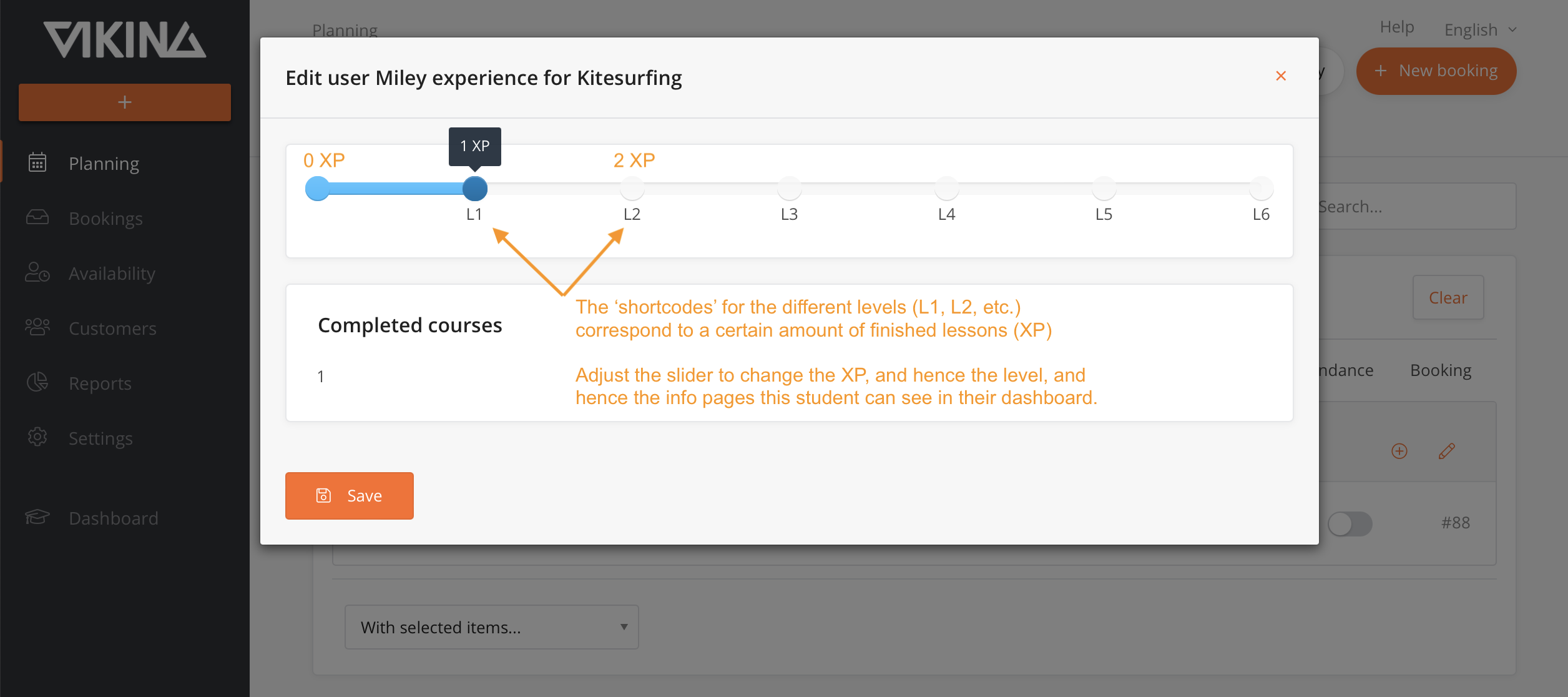
The default milestone plans are designed in such a way that 1XP simply corresponds to 1 Level. This has the advantage that after every completed lesson, the student gets an incentive to view a new info page.
If a student already has more experience, set their level correctly and they will be able to see all the info pages up to that level, plus the first upcoming one.
It is possible to set a requirement for completing multiple lessons (XP) before advancing to the next level (L2, etc.). To do so, when editing a milestone plan, navigate to settings, then milestones, and select the milestone. From there, you can specify the "XP required to complete this milestone" for each level. This allows you to determine the number of completed lessons a customer needs to access the new theory page and progress to the next level.
For instance, if XP and levels are the same, level 1 could have an XP requirement of 1, level 2 could have a requirement of 2, and level 3 could require 3 XP. Alternatively, if XP and levels are different, level 1 may require 1 XP, level 2 may require 3 XP, and level 3 may require 4 XP. In the latter case, a student would reach level 2 only after completing three lessons.
Advanced settings
Customising the milestone plans
Creating milestone plans for other sports
We are currently rolling out the milestone plans on a sport-by-sport basis (kitesurfing, surfing, winging, sup and windsurfing). If you don't see this sport in your system, please be patient, it will be updated. If you want to create a track for another sport/activity, please contact your account manager.
Disclaimer
- Your center is responsible for the contents of the milestone pages. Viking has only put down a general concept, which still needs to be reviewed and amended by your center.
- The (instruction) videos are compiled with the greatest possible care by a team of experts. Nevertheless, Viking does not accept any liability for the content.
- If you don't agree with the contents of the milestones pages, either change the content or in case of non-changeable content (videos), don't use the milestones update at all.
- If you want to disconnect the milestones from your system on the date of launch: go to your product settings - click on the product - disconnect the milestone from the product.
- The milestones are translated by Translation Kings. They know all about translations and nothing about water sports, so you might need to rewrite some stuff they translated.