November 2025
Improvements
System-wide technical upgrade completed
A full framework upgrade, PHP 8.3 and several infrastructure improvements are now live.
Privacy update: restricted access to Camps export
To protect personal data:
- Planners can view camps up to 14 days ahead (no export).
- School_admins can view and export within 14 days.
- Past camps cannot be exported.
- System managers retain full access.
Bug Fixes
- List view fixes in Booking Forms V2
The “date selection text” now displays correctly and the summary correctly shows the selected date. - Crossed-out times can no longer be selected
Unavailable time slots could still be auto-selected in rare cases, leading to overbookings. This is now fixed. - Accurate availability for overbooked groups
Slots that appeared available but could not be scheduled after payment now correctly reflect true availability. - German customer dashboard checkbox fix
Clicking “Ich akzeptiere…” no longer opens an unintended login popup. - Month names shown in mixed languages
Some booking forms displayed a mix of English and Dutch month or weekday names. This is now fixed for both V1 and V2 forms. - Login & participant selection improvements
Logging in during the booking flow could cause the form to freeze. This has been resolved.
- Default language when adding a customer
Augustus 2025
Improvements & Bug Fixes
-
Additional duration choices (15 & 45 minutes) when manually blocking an instructor
When manually blocking an instructor (with the pencil icon in the instructor box in the Day Planner), there were limited options for duration. These have been expanded with a 15 and 45 minute option for shorter tasks. Screenshot. -
Styling of the ‘group page’ (v2 booking forms) on mobile
Previously the image and description were displayed next to each other on the group page. This has been changed so that the text now shows below the image for a better experience on mobile devices. Screenshot. -
Inventory tracking fix in v2 booking forms
Some instances allowed bookings to come in when there was no inventory, particularly when there wasn’t any time slot left for the day. This has been fixed to only allow bookings if there is inventory. -
Discount code for full amount when used from the admin
When applying a discount code for a ‘full amount’ manually on the ‘Booking' page in the admin, the amount would reduce but the booking would not be marked as paid. This is now changed so the booking is correctly marked as paid. - Improved availability calculation when instructors are overbooked
In some instances, the system would unschedule lessons after a booking was made, on a timeslot that seemed available upon booking. This was caused by taking into account students that were placed in ‘overbooked groups’ (i.e. groups that exceeded the maximum group size from the product settings). A change has been made that allows students to be placed in the remaining groups if there is capacity with individual instructors. - Additional option (1 year) for ‘allow instructor to unset availability’
This gives schools the option to effectively disable the possibility for instructors to ‘unset’ their availability after it has been set in the instructor dashboard. Can be changed in Settings > Planning.
June 2025
Bug Fixes & Improvements
-
Availability issue with bundles (V2 booking form) – fixed
Bundle products were sometimes incorrectly showing availability due to a mismatch in how the “Allow bookings regardless of instructor availability” setting was applied. This is now correctly pulled from the product itself - not the bundle- so your schedule shows as it should. -
Location filtering in booking forms V2 now works properly
Previously, all locations were shown, even when you tried to restrict the booking form to just one. We’ve fixed that - and added a little extra:
If you have multiple locations selected, the schedule will now appear after a location is chosen, so customers don’t accidentally miss it. Also if there is only 1 location to be booked, this location will be visible to the customer, so make sure that in Settings > Locations your location name is accurate (even with just 1 location). -
Waiver status accuracy in day planner
If you were using the setting “One course per person, one group per slot”, waivers weren’t showing as signed in the day planner. That’s been fixed - signed waivers now appear correctly. -
Custom fields (scope: booking) now show up in V2
Custom fields set to “booking” scope weren’t visible in your booking details or daily overview when using V2 forms. These now display correctly where they should.
February 2025
New Features and Improvements
1. New summary page for booking forms V2
We’ve completely reimagined the summary page for Booking Forms V2, packed with new features:
- Upload your own photos for each booking form to display on the summary page.
- Deposits are now more clearly shown, even for multiple bookings.
- Discount codes are now added to the summary page per booking.
- Possibility to add another booking before payment.
- Fully optimized for a mobile-first design for seamless usability.
2. Discount codes update for booking forms V2
Discount codes have been moved from the first step of the booking process to the summary page, making the booking flow more intuitive and user-friendly. Screenshot
3. Updated texts in booking forms
Working with a conversion specialist, we’ve made all booking steps more clear and easy to follow. These updated texts are now live in English, Dutch, and German.
4. Help site links on settings pages
Relevant links to our support pages are now available directly on all settings pages for quick guidance whenever needed. Screenshot
5. Turn off waivers per product
You can now disable waivers for individual products directly in the product settings. Screenshot
Bug fixes
- Fixed an issue where gift card payments were incorrectly listed as 'invoice' in the transaction report. They now correctly show as 'gift card.'
- Resolved an issue where very large photos on the V2 forms overview slowed down the forms. Upload sizes are now managed for better performance.
- Fixed a rare issue where wrong products were displayed in the V2 forms when categories and subcategories were used.
- Resolved a bug where the customer age in the profile was always shown as 0.
- Fixed an issue where the login button did not work on some websites due to blocked local storage.
November 2024
1. Daily overview & Day planner performance
Previously, elements like QR codes and messages would load automatically, slowing down performance. Now, these items load only when clicked, drastically reducing load times. With updated servers and cleaned-up data, some of our tests have shown a 800% increase in daily overview speed!
2. Required signatures in rental module
The signature field in the rental module is now mandatory. If the field is empty, customers will receive an error message, preventing them from proceeding until a signature is provided.
3. Rescheduling of canceled lessons
This update prevents the rescheduling of canceled lessons in other open tabs, eliminating potential conflicts and improving scheduling accuracy, even when multiple tabs are in use.
4. Age display fix in customer profile
Previously, customer ages on the admin side displayed as “0 years old.” This has now been corrected.
5. Discount code fix in V2 booking forms
An issue where the maximum discount amount was not correctly applied in combination with discount percentages has been resolved.
6. Updated WordPress plugin
We’ve also released an update for the WordPress plugin to ensure compatibility and stability with Viking Bookings 7.2.
August 2024
1. Server upgrade for faster performance
Viking is now running on upgraded servers, boosting system speed by reducing slow requests. Additionally, we've taken steps to improve reliability, reducing the risk of downtime and enhancing overall stability.
2. Booking form V2 enhancements
We’ve made several important fixes to the Booking Form V2:
- Price display issue: Previously, prices of €0 were not shown on the booking form. This issue has been resolved.
- Multiple bookings: When using the shopping cart for multiple bookings, the system now defaults to 'enter new details' rather than using the name from the first booking.
- Email address validation: To avoid confusion, it’s no longer possible to use the same email address for multiple participants.
- Product display: Products with the same subcategory and category were not being displayed in the V2 forms. This has been corrected.
- Deposit visibility: Deposits are now properly displayed in the V2 forms.
- Availability display issue: In some specific cases availability was not shown correctly. This issue has been resolved.
3. Availability fix
Positive availability rules for the same product, location, and day but at different time slots are now correctly taken into account.
4. Payment Provider Wallee fix
We've addressed an issue where Wallee was unable to process payments for products or variants with long descriptions. This has been fixed.
July 2024
Booking Forms V2 - activate it yourself! We're thrilled to announce the public beta launch of Booking Forms V2. Here’s why you’ll love the new booking forms:
Faster Code
Although the forms may look the same, the underlying code has been completely rewritten and optimized to the latest standards for better performance.
New Functionality
We’ve added three new features:
- Summary Page: At the end of a booking form, customers can now review their booking and (optionally) add extra bookings.
- Shopping Cart: The sidebar in the booking form now shows an overview of all the current bookings.
- Overview Page: Create a single booking flow that includes multiple different booking forms, each with specific settings and products.
To start using these features, you need to activate them in your account.
- Explanation of Booking Forms V2
- How to Set Up Booking Forms V2
- Watch the video tutorial below:

Waivers update
These improvements make it easier to get waivers signed for group bookings and to check if waivers are signed correctly.
- If a waiver is signed, a ✓ symbol will be shown. Clicking on it will display a pop-up to add another waiver or view the signed waiver. Example
- Clicking on the student’s name in the signed waivers list will show the details of the signed waiver. Example
- For group bookings with only the booker's details ('one course per group'), an exclamation mark with the number of signed waivers is shown. Waivers can now easily be added for multiple people by scanning the QR code or adding waivers from the admin. Example
- To streamline the user interface, we are eliminating the small "Waiver has not been signed" pop-up in the daily overview and directly open the main waiver pop-up from where you can add or view waivers.
Wallee Payment Provider added
We've added support for the Swiss online payment provider Wallee - Extra cost apply, please contact us if you want to use Wallee for payments
May 2024
Align mobile 'Book now' button
You can now align the mobile 'Book Now' button on the right side, left side, or full width.
- To adjust this setting, go to Settings -> Booking Forms -> Select the Booking Form -> go to 'align button on mobile' and select your desired setting.
Age, weight, and language added in daily overview
- The daily overview now displays the age, weight, and language of your customers.
- See an example
Transaction export
- A new column, 'Handled By,' has been added to the transaction export.
Beta update for booking form
- For our beta customers, several updates have been made to the alignment of times and dates, optimizing them for conversion.
Update for external party app bookings
- We've optimized the booking form for use in external app bookings, specifically iOS.
March 2024
Waiver signed by admin In the daily overview, waivers can now also be signed by an admin. You first need to enable this feature in Settings > Booking. A few remarks:
- In the Signed Waivers list (on the user and booking detail page), the name of the admin appears in the "Checked by" column if it has been signed by an admin.
- On the Signed Waiver detail page, available collected information (IP address and browser details) is shown, along with a notification of which admin signed the waiver.
- The validity/expiration date is based on that in setting in Settings > Waiver Forms.
*Please note that the waiver has no validity if signed by an admin. That is why we built this functionality with a toggle in the settings.
SumUp support
We've added SumUp to the list of supported payment service providers (Settings > Payments).
Thai Baht support
We've added Thai Baht to the list of supported currencies.
Bug fix for voucher email
The 'create personal voucher' email that was sent out by the admin (Customers > Select customer > Create personal voucher) was empty. This issue has been fixed.
Slow Requests
We've updated slow-loading pages to load faster.
Dec 2023
Newsletter subscribers from August 29th onwards were not synced. Manually add them to Mailchimp by exporting from Viking and importing into Mailchimp. New export functionality is available for this:
In Reports > Export, set the date filter from September 1st to December 12th and check the 'Subscribed to newsletter' toggle. Export this list and import it into your mailchimp account manually. You need to be logged in with 2FA code. Screenshot.
Major Update for Milestone Users:
- Unlimited Plan Creation: Now create as many milestone plans as you need for any activity, such as kitesurfing, mountain biking, or skateboarding. To create a new plan, navigate to 'Settings', select 'Milestones', and then click on 'Create Plan'.
- Video Customization: Update videos in existing plans for activities like kitesurfing, surfing, and winging to suit your preferences.
- Flexible Step Modification: Add or remove steps in any plan for tailored customization. To modify a plan, go to 'Settings', choose 'Milestones', and select the desired milestone plan. To delete a step, click on the 'X' icon next to the step. To add a new step, scroll to the bottom of the list and click on 'Add Item'.
This update makes milestone plans fully customizable to align with your specific business needs. For more details on milestones, click here.
Newsletter subscriber enhancements
- New Export A 'Newsletter (Y/N)' toggle in exports helps identify newsletter subscribers and supports category-specific exports. The export feature is also in the customer export section. Screenshot
- Newsletter Checkbox Independent of Mailchimp In 'Settings > Marketing', use 'Custom Newsletter' to add a subscription checkbox to booking forms and customer accounts, compatible with any mailing list platform, not just Mailchimp. Screenshot
Note: Exports are available to system managers only.
First name in email templates
You can now use only the first name in emails for GDPR compliance and privacy (or 'tone of voice'). Change 'customer name' to 'customer first name' in templates using the magic wand icon.
Original course date in logsThe original course date has been added to all scheduling logs, making it easier for planners to see past activities and changes. Screenshot
October 2023
A Fresh Wave of Color
Say goodbye to the familiar orange and embrace a refreshing cool blue. This new hue not only reflects our passion for watersports but also underscores our commitment to reliable service. Dive deeper into our color change here.
Track Your Cancellations
You asked, we delivered! With a 'scheduling action log', you now can:
- Navigate to the 'Cancellations' tab in your daily overviews to see all cancellations made that day.
- View all cancellations and approvals for a specific booking directly on the booking detail page.
- Monitor all a customer's cancellations and approvals on the customer detail page.
Need more info? Check out our detailed guide here.
Availability improvement
The calculation for overlapping time slots between instructors and products has been improved. Previously, the booking form calendar displayed green dates in certain cases, even when no slots were available. This issue has been improved.
(!) Since we cannot test every possible availability scenario, please verify that your availability is functioning correctly. (!)
Enhanced Exports
- New customer export: System administrators can now make an export of the full customer database.
- Birthdays included in bookings-export: We've enriched booking exports by including customers' birth dates.
Traffic source
On the booking detail page, you can now view the traffic source for a specific booking, which means the name of the booking form used will be displayed.
Bugfix/ small improvements
- The logo size in emails is now restricted again.
- The onboarding of Mollie Connect is improved
July 2023
What's new
- Logo in email templates: In settings - general you can now add your logo. This logo will be visible in all sent emails.
- Improved Ical connection: Enhanced visibility in certain calendar apps for admins: The customer's email address and mobile number are synchronized and displayed in the title.
- Improved Ical connection: If the instructor has permission to view the customer's phone number, it is now synchronized in the Ical.
- New Mollie connection: For Mollie users, a new connection is enabled. You will receive a separate email about this.
What's fixed
- Login issues: Approximately two weeks ago, we identified an issue with the password reset email being delayed, causing login errors. This problem has been rectified, the password reset email is now instant.
- Enhanced instructor scheduling: We have implemented a fix to ensure that if an instructor is blocked for another activity, they will no longer be scheduled for any conflicting activities.
- Milestones emails for cancelled lessons: Our team has addressed the problem where milestones emails were erroneously being sent out, even for cancelled lessons. This issue has been resolved
Legacy tracking options removed
We removed the legacy tracking options for Viking. The exclusive method for tracking bookings is through this link: https://vikingbookings.crunch.help/en/marketing/ga4-tracking-through-google-tag-manager
June 2023
What's new
To streamline the process of adding instructors to products, you can now directly include them in the product settings.
We have introduced the ability to deactivate instructors. This role is automatically assigned when a user no longer holds a staff role (instructor, admin, etc.). By removing all staff roles from a team member, they will be designated as an 'Inactive Employee.'
In some very specific cases, mostly for rental items that can have more than 1 person (think of double kayaks, mega sups, boats, etc.) it makes more sense to display ’number of items’ instead of ’number of participants’ in the booking form. This string has now been added in Settings > Translations. If the above situation applies to you, please change this string manually and potentially make changes in the product settings. Read this article for more information.
May 2023
What's new
- The Google Tag Manager and GA4 documentation is ready
- A redesigned thank you page is added after customers buy a voucher
- In the instructor dashboard, days at which the instructor cannot teach any products are greyed out
What's updated
- The (automatic) disabling of a manager account after a period of inactivity is adjusted to 18 months.
- The chief instructor is now visible under the 'all' tab in the team.
What's fixed
- The newsletter toggle in customer accounts always shows the correct status again
- The history of student messages/notes is visible to the planner again
- The code is adjusted so that a delayed payment cannot be registered twice, even under exceptional circumstances.
March 2023
What's new:
- Clickable dates: Dates on the booking page now immediately 'click through' to that date in the day planner, saving valuable time in your everyday Viking workflow
- GA4 ready: Viking is now ready for GA4, documentation will follow
o Outdated tracking options have been removed
- Payment reminders:You can now send payment reminders directly from the daily overview page by clicking the open amount.
- Future course visibility: A new setting has been added under "Settings - Planning" called "Future courses visible to chief instructor". Here you can choose the number of days the head instructor is allowed to see upcoming courses.
- Simplified instructor dashboard: Toggles for times that cannot be used have been removed from the instructor dashboard and replaced with a stop sign icon, making it easier to view available times at a glance.
- New language: Portuguese language is now available in Viking.
Updates:
- iCal/gCal/WebCal streamlined calendar integration: Only one event per instructor is now visible in the external calendar
- Access to export button: The export button is now always visible in reports, even if your user role does not have the necessary permissions to download. You will receive a notification to change your user role if you attempt to download a report without the appropriate permissions
- Improved team visibility: System managers are now visible to lower roles on the team page, providing better transparency and accountability within the system.
Fixes:
- The import customer function has been fixed and is now working properly.
- The option to go back to 'all products' in the capacity view has been fixed.
Juni - februari 22/23
December 2022
Framework update
- Framework update
- PHP version upgrade
- PHP type hinting is added
- The ability to run static analysis and fix issues in the code is added
In plain English: we've updated the code so it’s faster and more reliable.
Other updates
- An Alert is added when you trigger an action that should send out an email, but the email template is disabled. If you get the alert, double check your email templates and enable the correct ones. This feature is added for these emails:
- Approval, Cancellation, Notification
- Payment reminder
- New account confirmation for walk-in booking
- Existing account confirmation for walk-in booking
- Improved selection and ordering of locations
- It’s now possible to drag and drop the order of your locations in Settings > Locations, to change the location order in the booking forms.
- Fix for milestones email template - it had been disabled since the last incidental send.
- Head's up (!): there might be situations where customers who've completed a lesson in the last two weeks, receive a 'new theory available' message.
- For customers using milestones already - it is now possible to connect rental and camp products to the milestones functionality
- Check stripe payment status after 10 minutes - additional measure to receive correct payment status in rare cases where a customer closes the Stripe window early.
- The date and time format is changed so it works around the world
- Eway (Australian service payment provider) is added
- The import function of clients was broken. It's fixed.
September 2022
New
- It is now possible to recover deleted products
- A filter is added with 'active' and 'deleted' products. To recover a deleted product, simply click on the product and click 'save', it will be added to the active product list
- Eway payment integration for Australia is added
- The bookers phone number is added to the system export
Updates
- We've updated the waiver flow from the admin:
- Signing 'as an admin' is deleted
- A new 'sign now' link to the waiver is added that opens the customer's waiver in a new tab
- Whilst having the customer sign a waiver like this is a vast improvement, for optimal security we recommend letting the customer scan the QR code because this way the user device, IP and browser are also recorded
Fixes
- A redirect bug to Stripe is fixed in the very rare situation of booking in a booking form while still logged in as an admin
- Fix for ‘inventory items for group’ calculation
- Fix for ‘waiver: not signed’ in customer profile with signed waiver
Augustus 2022
Hardware with regards to the power supply of the servers was changed.
June 2022
Performance update
- The operating system has been upgraded
- The database server has been upgraded
- All other software on the server has been upgraded
- A new performance measurement feature is added to the database
- Basic tuning of the database
Student account restyling
Because we are working on new features for the student accounts, we had to restyle it. The main colors remain the same, so your student will feel they are in your center's environment.
Also, we've already added 1 of the new features to the customer accounts: When a booking is unpaid and unplanned, the customer can now delete the booking himself.
What's new - other
- All login buttons in the booking form are now pop-ups
- We've updated the login procedure so it works in all browsers
- The Head instructor can now email students from his account
March 2022
New
- An email address copy is added to the student detail page
- A bulk delete option is added to the student detail page
- We've made multiple improvements to the instructor dashboard:
- If availability is added, the box in the monthly view gets a status
- Styling issue with the recurring availability button is fixed
- The toggle colors are changed for a more clear overview
- Days that cannot be clicked, are greyed out in the agenda
- Add country code before phone number is added to all phone number fields
Updates
- The filters in the daily overview are remembered when switching views
- The school manager can now export the daily transaction total
- Pictures in the info pages are being resized for a better looking page
Fixes
- The login button in the booking form for existing customers is fixed
Januari 2022
- 2FA is temporarily turned off for planners and school managers
- Instructor accounts are streamlined with the Viking admin dashboard
- If the instructor has a double role (i.e. planner and instructor) - then the instructor account will be shown as 'My Viking' in the main menu.
- The Viking logo is added to all team accounts
- The admin messages in the instructor accounts are fixed.
December 2021
- All admin accounts will get 2 factor authentication with the corresponding email address. So make sure that all the email addresses of the users are correct.
- The system manager (currently 'admin') will automatically be logged out after 1 hour. While we don't recommend it, this role is open by default on many (center) computers. If multiple colleagues are working on that computer, it will not be possible to work with this role anymore;
- Create new user roles in these cases for a school manager or planner. They are not automatically logged out and this account can stay open all day more safely.
Security updates
The user roles are redesigned around safety, specifically around exporting customer data. In a nutshell:
- Revised permissions for the 3 admin roles: Planner, School Manager and System Manager
- Only the System Manager can make large exports
- The System Manager will automatically be logged out after 1 hour
- Every admin role will require 2FA with the set email address
Other new security features:
- Accounts for all three admin roles will automatically be deactivated after 7 months of inactivity
- Planners can only make the daily schedule exports for today and tomorrow
- School Managers can make the daily exports plus camps exports
- Only the School and System Manager are allowed to add/delete other users
More information about the new user roles
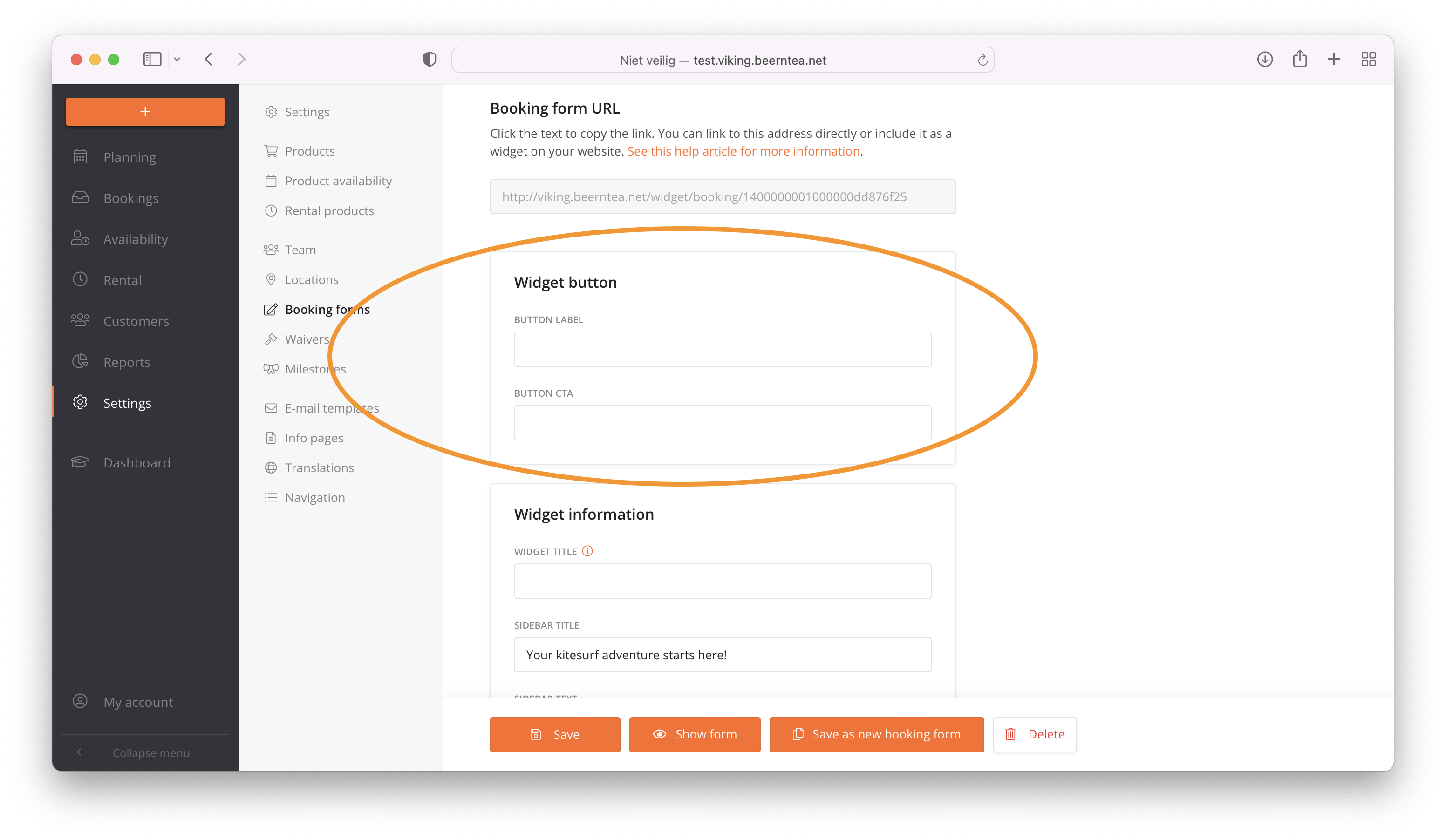
Floating button update:
You can add extra text per booking form and you can change the text of the button per booking form. This will increase your conversion if used correctly:
November 2021
- Launcher V2 button is added to all systems. The button is full with sticky on mobile and redesigned on desktop.
- In the overviews Waivers and Inventory items it is now possible to request deleted items and to reactivate them by saving them
- In the waivers list boxes, only active waivers and the current selection (even if it is no longer active) are displayed
- In the day planner / inventory claims, only inventory items are displayed that are active or that have reservations in the system on that day
Oktober 2021
Big update in our datacenter. It concerns on one hand a software update to the server and on the other hand a replacement of the hardware.
September 2021
Changes in Viking manager:
- Invoicing is automated
- Revenue exports are automated
- Valuta conversions are added
- WeFact API is added
August 2021
1. A Discounts tab has been added in reporting, here all discounts in a certain period can be viewed and exported, by sorting and filtering in Excel.
Things to know:
- If a discount code has been used, the total discount amount will appear when booking (next to price), with an info button for a detailed overview
- Used discount codes are no longer added as a message to the booking as this is now tracked separately
- The above only applies to discount codes entered after the update goes live
2. An update in inventory claims is made. This now works even more intuitive for the planner.
June 2021
What's new | Stripe checkout update
We have updated the Stripe API to the V2 version.This now supports Apple Pay, Google Pay, coupons and more. Stripe users have reported an increase in conversion of as much as 7.7% after migrating to the new version.
There is no need to change the API keys in Viking, you might want to update your Stripe settings and add more payment options.
What's new | Email templates
After our winter survey, there were 2 much requested extra email templates that we now implemented in your Viking system:
- A payment confirmation email is added
- An email to be sent 7 days before the first planned day is added
Variables are added in these emails:
- Direct Payment Link variable is now available in Booking Confirmation and Course Approval email
- Location name and description variables are now available in Booking Confirmation (if known at time of booking)
- Booking number variable is now available in the Booking Confirmation email.
What's new | allocate an instructor
It's now possible to allocate an instructor in advance, to teach a certain lesson at a certain time. Read more or see screenshot.
what's new | others
- Inventory now works in camp products.
- Select all button added to instructor settings
- Transaction export - first scheduled date is added (specifically for UK customers)
- Strip 'public booking form name' in the variant product selection field in booking forms setup (it now only shows the variant name) for clearity.
May 2021
Tracking
We've updated the tracking feature again. Enhanced ecommerce is added so you can measure transactions in Analytics via Emerce (a big efficiency update) and we have added server side tracking.
Why server side tracking?
With the new Apple and Chrome updates, you can no longer track conversions without the explicit consent of the user in the browser (even if they agree on tracking on your website). For example, with the Apple IOS 14 update, users will see a pop-up in which they can indicate that you explicitly give apps permission to track conversions. People who do not give permission for this can therefore no longer be followed via marketing tracking. Even if they agreed to tracking on your website.
Basically, tracking your marketing efforts is getting harder and harder and less reliable with every browser update.
Solution: Currently it is still allowed to track logged in users. And when using Viking, customers are logged in after they click on the 'book now' button on your website. We are allowed to track these bookings via server side tracking. So it is still possible to track conversions, even after the Apple and Chrome updates. This is why we added this.
We've written an article on how to use the tracking feature.
Drag & drop and daily schedule upgrades
These are the little details that seem small, but that can make your daily operations so much easier! Review them carefully.
- It is now visible in the drag & drop when an instructor is already booked on another lesson when using the function 'block overlapping slots'.
- You can change the instructor per group in the drag & drop and in the daily schedule.
- You can add an instructor per group in 'not scheduled' blocks in the drag & drop.
- A clear button is added to the filters for faster working.
- Set your colors in drag & drop
Other updates
- Select all buttons are added to the dropdown selection box in the booking form. In the next update this will be added in other places as well.
- Notifications are added to the admin and the customer when a group booking is split. Screenshot 1 admin account | Screenshot 2 student account
- Allow the variable <total amount> / <amount> in the email templates with the booking confirmation.
- Conversion update: In the mobile booking form, when people go to step 2, make sure it starts at the top of the page.
- Conversion update: If the booking form is completed in Instagram browser, an unclear message to leave the page will be prevented.
March 2021
The inventory update for SUP centers**
This update is mainly made for SUP centers who do lessons and rentals and have an X amount of boards. With the inventory management update it will not be possible to overbook your inventory anymore when planning rentals and lessons.
What is built:
- Rental products have a duration now
- Inventory management is added in settings
- Add your inventory items and the available quantity
- Set per product(variant) what inventory items are needed
- In the planning, an inventory tab is added
- Show timeline for a quick overview
- Show time slots for an overview per time
- Click on a time slot for an overview per board
- In the drag & drop, an item is added to see what inventory is used
All new updates
- Notes section in the overviews is added
- Rentals and camps now have different colors in Drag & Drop
- Payment reminder button is added in the booking
- A payment reminder email is added in email templates
- Several fixes in email templates
- Several fixes in the booking form update
- Danish translation is added
Voucher codes updates
- Voucher codes can be added from the admin
- Voucher codes can be reused if the full amount is not used
- In the customer dashboard, open personal codes are shown
- In the admin dashboard, open personal codes are shown
Februari 2021
Revenue general page update
- All your products and categories are now showing - this saves tons of time looking up specific revenues
- The paid, unpaid and total bookings are now clickable.
When clicking, you will only see the bookings that match the filters. This is a new tool to easily check and follow up on unpaid bookings.
New features across revenue tabs
- Selected dates are remembered over tabs
- A today button is added
- Occupancy rate is now showing
Here you can see the occupancy rate of your lessons with instructors. This is a tool for owners to see how well the managers are planning the lessons.
This is mainly done in combination with the today button, to easily end the day and check if the revenue in Viking is matching the actual revenue on your end.
Other updates in Viking
- Remarks in the day planner, are now showing and editable from the daily overview
- In the start times planner, you can now group by instructor to easily see open gaps
- Select all button per day added in instructor availability
- Blank spaces are stripped from usernames
when customers are copying and pasting their username into Viking, it will still work if they accidentally added a blank space.
- French and Polish language are added
- The 'product variant' is added in the CSV export for camps
- In discount codes, in the 'discount type', 2 types are added:
1. The option to use the code for a complete booking (independent of number of participants)
2. The option to use the code per person
Januari 2021
- Blank spaces are stripped from e-mailadresses when logged in
- A complete redesign of the Help Center
Viking 4.3 is launched | The booking form update
Improved features
- Improved clarity in case of low availability of a product
- Improved clarity for camps and multiple day rentals
- Improved clarity to select available time slots
- Improved clarity when booking for someone else
- Better styling that invites you to click - hover effects are added to everything clickable
- Bigger selection fields are added for mobile bookings
- Date of birth field is updated
- Improved tracking features
New features
- A hover-button for on your website
- Pop-up functionality
- Wizard functionality
- FAQ functionality
- Explanation functionality
- Login pop-up for existing customers
- The agenda has been made more compact so that 2 months fit next to each other
- A WordPress plugin is now available
- The agenda is open on the 1st month with availability
December 2020
- Discount codes are now applicable per person and per booking
October 2020
- Columns per instructor in start time planner are added for work speed
September 2020
- Product variant is added to camps csv export
- Polish translation is added
July 2020
- A new user role is added. We've added an extra article in the Helpsite here.
June 2020
- Updated the time selector in the booking form
- Updated the Ical connection
- Fix for camp scheduling
May 2020
- Added Swiss francs
- Allow planner to acces waiver functions
March 2020
- Added the option to block today's slots
Februari 2020
- Add category filter for product availability schedule
- Customer import function is added
- When a course is completed and not approved, it is renamed to 'given'
Januari 2020
- Digital waivers are added. We've added an extra article in the Helpsite here.
- There is A new version of the embed code for the gift vouchers. For more information, check the December update below.
December 2019
- Gift vouchers are added. We've added an extra article in the Helpsite here.
November 2019
- Discount and coupon codes are added. See https://www.vikingbookings.com/viking-4-1/ - we've added an extra article in the Helpsite here.
- The experience level of your students is now forecasted. So if they scheduled 3 lessons, the 3rd lesson is showing XP3 now.
- We added a live counter on the VIKING bookings website. it counts system wide all scheduled lessons, number of users and number of countries.
- The filter 'part paid' is added to the booking overview.
- The filter 'part paid' is added to reports.
- The button recurring availability is added to the mobile account of the instructors.
- There is now a link to the deeper settings in the mobile admin login.
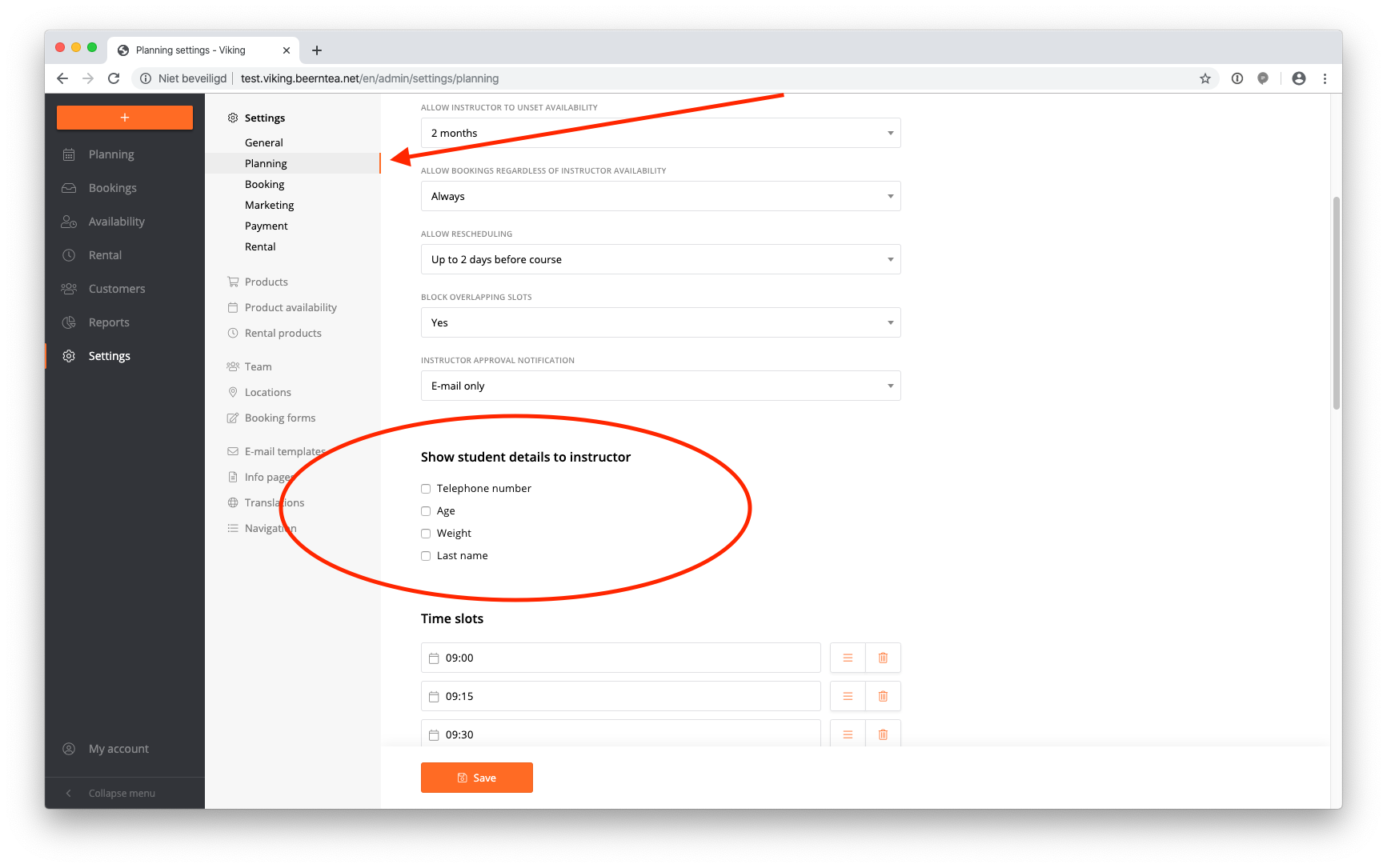
- In the instructor accounts we added more options for them to see student details. You can manage what information the instructors see in Settings - Planning. See screenshot:
- A category filter is added in reports
- Administrative email address(es) are added to the settings. Now you can receive new bookings information in multiple email inboxes.
- The difference between the booker and the participants is made more clear through the whole system.
October 2019
- When a customer did not pay yet, the open amount is back in the daily schedule (yeahh!)
- When a course is not paid, not planned, the customer could not see availability in his account. This is added.
- More options are added when you want to block a day / timeslot / product from the daily overview.
- Category filters are added in reports
- BOOM - instructors notifications are added, see the box below!
Choose from:
E-mail only
Prefer SMS, e-mail is phone number is empty
Email and SMS
Explanation on how it works
When approving and rejecting a course, a check mark is added to send a notification to the instructor. This works independently of the choice whether or not to send mail to the students.
When approving, an e-mail is sent with the first approved course. When cancelling, an e-mail is sent after the last cancelled course (when there are no remaining courses). In the event of changes in time and location, the mark will be removed and the instructor can be sent again via approval. After sending the message, a green check mark appears next to the instructor's name in the daily overview.
September 2019
- Payment reminder email: the open amount will be shown in stead of the full amount. This is for centers using deposits.
- The option to delete a booking is added to the booking. It will only show if the payment is not made, and all the courses are not scheduled.
- When sending out a notification email, it will show in the daily schedule.
- The blocking function from the daily schedule will always make an extra rule in product availability. Even for tomorrow.
August 2019
- If you work with 1 location, the agenda is open by default.
- In the booking reports, the expiration date is added to the export + an extra filter is made.
- On the booking confirmation to the center, the 1st date picked is added (when provided).
July 2019
- The option for the instructor to take payments is added
- The option for the instructor to set the waiver to signed is added
- In the options, under planning, the option to turn these settings on or off is added
- From now on, the extra development will be seen directly in your VIKING dashboard
June 2019
Bugfixes after the biggest update ever:
- The booking form had glitches on some Ipads, this is fixed
- New bookings will be seen first in booking lists
- A pay back method is added to the admins
- In the planner accounts, you could not click the price. This is fixed
- Lots of minor fixes & updates under the hood
May 2019
- An option to make each product bookable until X hours / days before course starts
- Course name button is added to the product
- Lots of updates under the hood
April 2019
- Direct payment link in payment emails
- Redsys integration for Spain
- The option 'allow instructors to unset availability' is added to settings
- Duplicate booking forms
- Duplicate availability rules
- Swedish translation of the whole system
- German translation of booking form
- The default in the bookings tab is now 'all bookings'
- More information is added in several CSV exports
April 2019
Super fresh update!! It's all in the details.
- Easier, more intuitive, new functionality. A full visual redesign. Easier & more intuitive to work with. Pages are merged together and have better functionality: this guarantees incredible efficiency, so you get more done with less clicks. A new dashboard for your customers that does not look like a ‘system’. Work faster, smarter and happier with VIKING 4.0.
- Improved planner & admin functionalities
- More possibilities to adjust bookings, with an intuitive way of working. Add courses to existing bookings, add customers to existing bookings. Delete courses of existing bookings.
- Assign participants to bookers. for example a father that is booking for his kids!
- Repeat bookings with the click of a button. The same people, products and price is duplicated. A much requested feature for work speed!
- Much more easily split customers who booked together & let them continue booking themselves!
- Rescheduling 2.0. More options to let students reschedule consecutive days or single days within consecutive days. Think of rescheduling (days of) weekly rentals & camps.
- View ‘only booked’ timeslots. For your convenience, making the system lots quicker to work with.
- 2019 look & feel, slick, modern, because you only want the best.
- Different type of pages, same general layout. To get to know the system faster.
- Main menu is collapsable. Now there is more space for the important stuff. Your customers.
- Cleaner daily overview. The daily overview is now even clearer and easier for the planner to see what’s going on. Not to mention the functionalities that are added!
- Better mobile experience. Instructors and students account are made ‘mobile first’. Admin and planner account have a much better mobile experience.
- Every page is updated.
- Improved daily overview
- Improved click to action. The new daily overview is made to work in. So (changing) payment, rescheduling, repeat bookings, messaging and much more can all be done from the daily overview.
- Today button is added. For improved work speed.
- See group sizes and number of participants of classes. 3/10 places are taken.
- Add participants directly in the group from daily overview. For improved work speed.
- And mucho more, because the details make the difference.
MARCH 2019
Added:
- Direct payment link is added to the payment reminder e-mail template. Which gives a button in the e-mail that goes directly to the payment page (from the PSP, or credit card / stripe page on Viking). You will also receive a short message here if the booking has already been paid and about the payment status, with a button below to log in and go to your booking.
- “Allow instructor to unset availability” option is added in settings –> planning. Here you can choose how long from now the instructor is allowed to delete availability in his account.
- Booking forms can easily be duplicated
- Age, date of birth and weight are added to exports
- You can change questions and answers for the exports in the booking page (click on the messages), and then the CSV’s wil show the changes.
Updated:
- In the reports page, you can now see if guests paid a deposit
- In some cases, the booking form was ‘jumping’, this is fixed
- Booking scope in the booking form is now shown between the students information and calendar
FEBRUARY 2019
Added:
- Option to enable and disable email templates with a checkbox.
- Option to set the instructor availability per location.
- Option to book for someone else in the booking form.
- Option to show the calendar in the booking form when using bundle products. It will show the availability of the 1st product in the bundle.
- Extra checkbox is added to the booking form. You can set this in the bookingform under Custom text – Checkbox text. The checkbox appears at the bottom of the booking form between the general conditions and the newsletter.
- Possibility to make custom fields in the booking form required.
- Possibility to add choice fields to the booking form.
- Option to export the daily schedule in CSV. As well it will show all extra fields that you request in your booking form.
- When using daily repetition in products, the booking form will now show all the days in stead of just the starting day.
- In reports – the tab transactions is added. Here it will show all transactions made by the system. You can use this to export to your accounting program.
Updated:
- Students will only see locations for their product, if they are available in the product availability
- When students go to checkout, they will now see their name, product name and booking number. Before they only saw the booking number.
JANUARY 2019
Added:
- Availability Scheduler for tide-based products (Specifically developed for lessons with strongly fluctuating start times every day, the new scheduler allows you to easily set product availability timeslots in a calendar overview).
Simulate tide tables in your available time slots
Works in conjunction with the normal ‘availability rules’
- Options in the availability scheduler for tide-based products:
Setup general availability.
First, per product, setup the general availability. Beginner classes only on Saturday and Sunday. Advanced Monday and Wednesday. Private all week. After this set the tides per product.
Set tides per product.
We’ve made the scheduler so you can set the tides for all products at once. Or you can set the tides per product. Because beginner lessons can be taught on low tides. And advanced all day.
Choose what product is tide dependent.
Some products are not dependent on tides. You don’t need to schedule them with the tide scheduler. In the product settings, easily set what product can be scheduled with the tide scheduler and what product not.
Set the tides per location.
Products may run on different time on location A then on location B. Easily set the tides per location.
- Possibility to move calendar in booking form. You can now change the position of the calendar in the booking form. There are these options now in your booking forms:
- Do not show
- Show calendar before personal information
- Show calendar after personal information
- Show list before personal information
- Show list after personal information - Added: payable hours to instructors account. The instructor can now see all the lessons he has taught in the past.
- HTML Style location description. You can now style the location description in these ways:
- Add a link
- Make bold, italic, or underlined. - Allow rescheduling for student per product. You can set the rescheduling for the guest account now per product. So for instance, a student can reschedule his class up to 2 days prior to his class, and a camp is not to be rescheduled for the student. (you can find this in products – select product – allow rescheduling).
- Added internal name for products. To make the system setup more clear, it is now possible to add an ‘internal name’ for the products. The regular name still shows in booking forms.
- Overruling for the planner. A planner can now overrule any (lack of) availability with the checkbox ‘ignore max capacity’ after clicking on ‘schedule’ in the booking. For easier planning!
- Present box in daily overview for repeated bookings. When a booking repeats itself automatically upon scheduling, the ‘present’ box in the daily overview will now work for the full amount of days / slots scheduled. You can still deselect 1 day. This will work better for camps and multiple day rentals.
Small fixes:
- List view now only shows available slots.
- A client can pay online for past lessons (after he had his lesson) – not recommended!
- The option to add your own url after booking is deleted – for users who are using this, it will still work.
- Booking forms now have standard values
Bugfix:
- When changing courses and keeping the instructor, all the data was lost. This is now fixed.
- Optional booking form fields to additional students, are now really optional (stayed, in some cases, on required before)
- The newsletter checkbox is not shown when Mailchimp is not connected
- In certain repetition settings, the daily overview did not sort the students correct under the products.
December 2018
Added:
- Possibility to export camps to CSV
- Lots of extra options in reports
Bugfix:
- Payment required in the variant, did not work with deposits. Fixed.
- In your daily overview, you only see the remaining amount in stead of the full amount when using deposits.
November 2018
Added:
- More variable fields in the approval email (instructor, instructor telephone number, names of the other people in the booking)
- Stripe connection
- Possibility to ask for deposits per product
- Upload your own terms of use
October 2018
Bugfix:
- List view is now a lot faster
- Automatically have a standard course checked in the list view
- Bookable by admin was not visible for the planner. This is fixed.
September 2018
Added:
A lot of new options in booking forms:
- Tracing source per booking form (to embed on other websites)
- Specify locations per booking form
- Have a booking form visible or not in the students accounts
- Add extra fields to the booking or the student in the booking form
- Easily add extra text
Bugfix:
- For 1 day courses, the option to choose the number of days is taken out of the booking form
- Missing fields with product type is fixed
- Choosing dates in list view had a small bug, is fixed
August 2018
Added:
- A lot of new options in product variants. The option to automatically book multiple-day courses on a daily or weekly repetition
- The option to have the variant bookable by 1. Only the admin 2. Only by existing users 3. By new users
- Payment required yes / no per variant
- Making multiple booking forms. The ‘form title’ is used in the user’s accounts. You can now make multiple forms for the student’s accounts.
- Hide products for customers, to be bookable by admin only.
- Get specific upsell booking forms with special discounted prices that you can combine with the automated upsell emails (!).
- Put in hire equipment for multiple days. VIKING can now calculate if you have enough availability over the week if you for eg have 40 freestyle sets and 20 race sets available per day.
- Put in your weekly repetition courses with groups that you want to keep together.
- Put in a ‘weekender course’
July 2018
Added;
- The ‘start times’ is now showing reserved instructors
- The variants of products are added to reports and to bookings
- Number of unscheduled courses and planned courses are visible in reports and bookings
- Number of given lessons during a certain period is now added to reports
- A lot of filters are added to the bookings tab under reports. As well you can make an export here.
Updated:
- The Ical connection is now showing instructors that are reserved for other activities
- The instructor can leave remarks to courses/students in the past (in their account, click on availability, click on the date and leave a remark)
June 2018
Added;
- Block overlapping slots function
- More payment options to filter on the booking page
- A status filter on the booking page
Updated:
- Product availability is working more intuitive in the category and product combinations (set max per category)
- Ical is now taking product times into account
- Logo’s are sharper
May 2018
Added;
- We added the option to approve lessons without notification
- In the booking, you can now say that it’s paid per invoice.
- You can change group sizes from the daily overview (click on the name, select group size)
Updated:
- We added completed bookings to the student’s accounts again.
Bugfix:
- When blocking tomorrow from the daily overview, previously blocked instructors are not overruled anymore.
- When booking for an existing customer, the date of birth is now automatically added (did not work before).
- Checkbox in the daily schedule for 1 whole timeslot did not work. We removed this and added it per instructor.
- As an admin, the scheduling of the first date did not work when using the setting ‘require payment before scheduling’. This is fixed.
- When 2nd and 3rd people in a booking did not put in their email address, the student level did not work for those people. This is now fixed per booking. The progress of course participants without an e-mail address is maintained, however with a new booking this is seen as a new student because the system cannot reliably match the person (this is done on the basis of e-mail address).
- When using multiple locations, the weekly overview did not show every single location correctly. This is now fixed.
- A planner could not add messages – this is fixed
- Search bar for extra bookers is now working
April 2018
Added:
- Upload a photo in the student booking process
- Instructors tab is added in daily overview
- Reports – payout report – is now available per date
- FAQ added
Updated:
- The whole student’s account + booking steps are updated
- The daily schedule and the day planner both got an ‘overhaul’
Bugfix;
- Several technical issues with drag & drop
- Reports – paid booking – did not show card bookings.
- The instructor’s accounts sometimes did not see lessons
March 2018
Added (GDPR law);
- GDPR -A newsletter signup checkbox in the booking form.
- A checkbox for the privacy policy that you can add yourself.
- An extra popup where people leave their personal data. Here you can write what you do with this dat
February 2018
Added:
- Block instructor for other activity functionality
- Checkbox for students presence
- Instructors van leave messages to students as well (before it was only to bookings)
- 4th Option in group booking settings
- Different texts in booking form for rentals and lessons
- Spanish translation of the system
Bugfix:
- Locations + descriptions is now translatable
- The bulk operation in the instructor’s accounts to add availability now takes their personal product availability into account
- Minimum height in the day planner to organize it better
- Google tag manager is now working in the Analytics tracking
Januari 2018
Added the Start time changer tool, to avoid crowds at the station
- Overview in a glance. In a glance see how busy you are on certain times. Directly take the desired action. Using this feature will only cost you a minute. The outcome of this feature will make your center more professional, your customers happier and your staff less stressed.
- Works with drag & drop. Easily grab an instructor group with students and drop them 15 minutes apart. Fast, intuitive & easy.
- Overlapping slots. Manual work can be error prone. That’s why instructor blocks will turn orange if the same instructor is overlapped. Overview in a glance ;-).
- Connect with Ical. Connect your VIKING account to your Google or Apple agenda. All groups are directly in your agenda on the right time. Easy peasy.
Added:
- It is now possible to combine products (eg. rental with lesson)
- Change student experience in the day schedule
- Availability tester tool
Updated:
- Improved (almost new) email builder
- Locations update
- Improved approvals
- Instructor availability improvement
- Notification when the course is paid in students account
- Notification in students account if there are open slots
Bugfix:
- If you delete products, they are still bookable for the customers who already booked that product.
- With the new email editor, the booking system URL is now a link for all email providers.
December 2017
Updated:
- New booking form.
- We updated the looks on desktop and mobile.
- We made it future proof so that we can easily add extra functions.
Bugfix:
- Minor fixes in payment settings
November 2017
Updated:
- Grouping in drag & drop is now based on group size. Big groups go first, private lessons last.
- When a student turns red in the drag & drop, the system will now say why he turns red (eg. overbooked, the instructor cannot teach the product)
- Readability of student experience, language, weight, and age is improved
Bugfix:
- An icon will not be made for single bookings
- First date picker in admin account fixed
October 2017
Added drag and drop interface for daily planning
Some features of the drag & drop, the are based on:
- Booked product
- Do students belong together?
- Weight based
- Age
- Language
- Comments left by the instructor
- And their level of riding.
NOW you can make the perfect planning.
Overrule VIKING
Instructors can only teach certain products. Students book different kind of products. VIKING will automatically assign the right students to the capable instructor.
Do you want to overrule this in the drag & drop? VIKING will show you a ! notification saying there is a mismatch, however the planner can still overrule. This guarantees flexibility when needed.
Added:
- Exclusive group-booking
Option to let groups book by themselves. No other students will automatically be added to the class. - Block course day
You can block the next day for your customers to book if you want to make the day schedule yourself. As well you can block a day in the future. - Waiver check
Keep track of which students signed the waiver. Make sure that there are no mistakes made. - Tracking of booking source
Always know where your bookings came from, even with third parties. - Exact online API – No more accounting! Do you hate spending hours in accounting? With our Exact accounting API, VIKING will send every paid booking directly to your accounting software. Exact will automatically make invoices and put those automatically into your administration. You’ll always have, real-time, 100% insight into your operation. The cost of this API is a one-time investment of 900 Euros.
- Rental products. You can add rental products to the system now.
- Book a course for someone else. In the student’s account, the student can now book for a family member, friend etc. directly in his account.
- Timezones added
In settings set your correct timezone. - Currencies added
Euros
American dollars
Australian dollars
South African Rand
Pound sterling - More payment providers adde
CX pay
PayGate added
Changed:
- Improved interface
Your product availability, products, and settings got a complete makeover. Blocks are collapsible now and easy to shift around.
September 2017
Update:
- Updating and renewing our servers – VIKING is now at least 30% quicker. Besides that, there is a big security improvement.
August 2017
Update:
- Update in the layout of the menu.
- Extra filters are added to the bookings lists.
Added:
- You can set the number of minutes per product now for your instructor’s payments.
- When sending a message to a student through the system, he will be emailed now as well.
July 2017
Updates:
- Info popup box is added to the software for important announcements.
- The option to let instructors accept payments: Go to settings - payments - set 'let instructors accept payments' to yes. Now instructors can accept payments from their account.
- Better day and week schedules for accounts who are not using instructors.
- Better student experience in day schedules.
Added:
- Instructors, planners, and students can add messages to the student’s log. Everybody can keep track of the student’s learning curve better and it’s easier to select the right group per student.
- Standby email. When students start calling you in the daytime, and you don’t know if the lessons are on or not because of the weather, you can now easily send all the waiting students an email and a text saying the lessons are stand-by and they will be notified in X amount of time.
- Did not pay and did not select a date email. If the student books, but doesn’t pay and don’t select any dates, the next dat an automated email will go out asking if we can help the student with planning.
- Ical connection. Connect to Google, apple or Outlook calendar.
- Paypal API
June 2017
Added:
- Weekly schedule
- Upsell emails
- Revenue reports
Update:
- Day schedule has had a complete more intuitive makeover
- Set payments in day schedule
- Better date picker
Bugfix
- Bug fixed in booking form with the date picker for schools that have only 1 location
May 2017
Added:
- Book a course for a student directly from the back end
- Change already made bookings easily (for eg make a lesson package smaller)
- Email templates per sport
- Next to instructor availability, now product availability is added as well
- Weight of the student
Update:
- Overview page of the student improved
- Booking page of the student improved
- More easily book for the student from the back end
- New iframe – better trackings
- Date of birth picker improved
Bugfix:
- Bug fixed in booking form when students left the same email address for 2 different students
April 2017
Added:
- Tracking of Analytics
- Sending events to Analytics
- Possibility to add your own thank you page
- Tool for the school to possibly change every word in the system
- Password recovery email
Update:
- Improve the usability of the Iframe
- Automatically let the system approve all the lessons after a time the school manager can set
- Added minutes instead of hours
Bugfix:
- Cancellation of a multiple people booking in the day schedule fixed
- Required payment issue is fixed
- System did not recognize placeholders in emails
- Translations fix